
What Is WebAssembly? Why WASM Apps Are Replacing Cloud Servers
WebAssembly (WASM) runs near-native code directly in your browser, eliminating uploads to cloud servers. Learn why local processing is faster, cheaper, and private.
What Is WebAssembly? Why WASM Apps Are Replacing Cloud Servers
WebAssembly (WASM) is a binary instruction format that lets browsers run code written in languages like C, C++, Rust, and Go at near-native speed — entirely inside your browser, without sending your data to any server. For privacy-sensitive tasks like file conversion, image editing, or PDF processing, WASM means your data never leaves your device.
WebAssembly — or WASM — is the closest thing the web has to a superpower right now. For years, we were stuck in a loop: if you wanted a web app to do something heavy (like edit a video, crunch massive datasets, or convert a file), you had to ship that data off to a server.
That "request-response" dance is slow, expensive, and a privacy liability.
WASM changes the architecture entirely. It lets us run high-performance code at near-native speeds right inside your web browser. No cloud servers required. Let's break down exactly what a WASM app is, how it compares to traditional server processing, and why this shift is the biggest win for your privacy in a decade.
How Does Traditional Cloud Processing Work?
To understand why WASM is revolutionary, we first need to look at how traditional web applications operate.
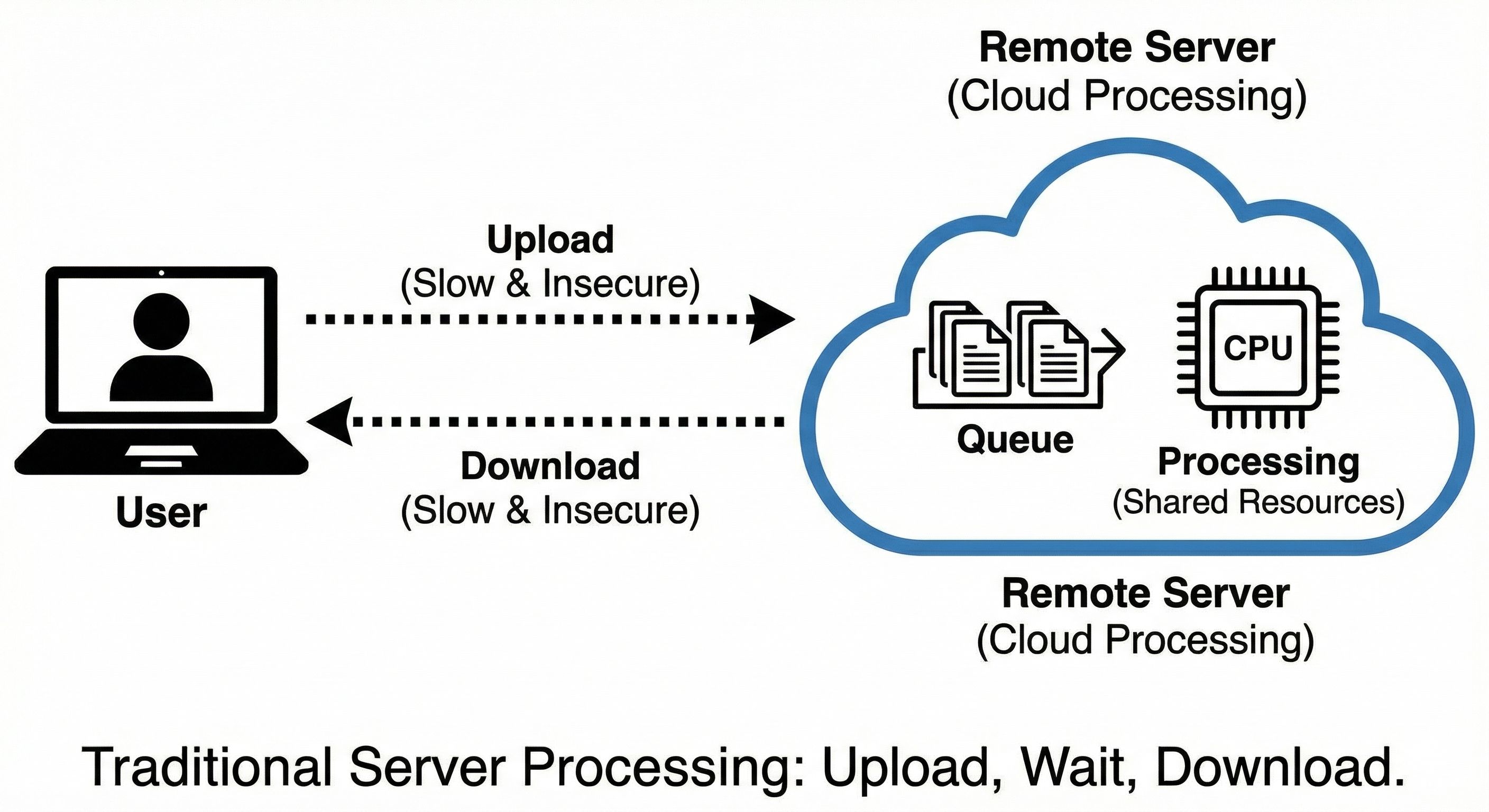
Imagine you want to merge multiple PDFs using a typical online tool. Here is the standard workflow:
- The Upload: You select the 50 MB PDF on your computer. Your browser sends this file across the internet to a remote server. You wait.
- The Queue: Your file arrives at the server, sitting in a queue behind requests from hundreds of other users.
- The Processing: The server finally allocates CPU and RAM to process your PDF.
- The Download: The server sends the processed PDF back across the internet to your browser. You wait again.
This architecture works. We built the modern internet on it. But it has massive flaws for user experience.
You are entirely dependent on your internet connection speed. If your Wi-Fi drops, the process fails. If the server goes down, the tool is broken. And worst of all, you are handing potentially sensitive data to a third-party server. Who owns that server? Are they keeping a copy of your tax return? You have to trust them — and trust is a fragile thing on the web.
How Does WebAssembly Change the Architecture?
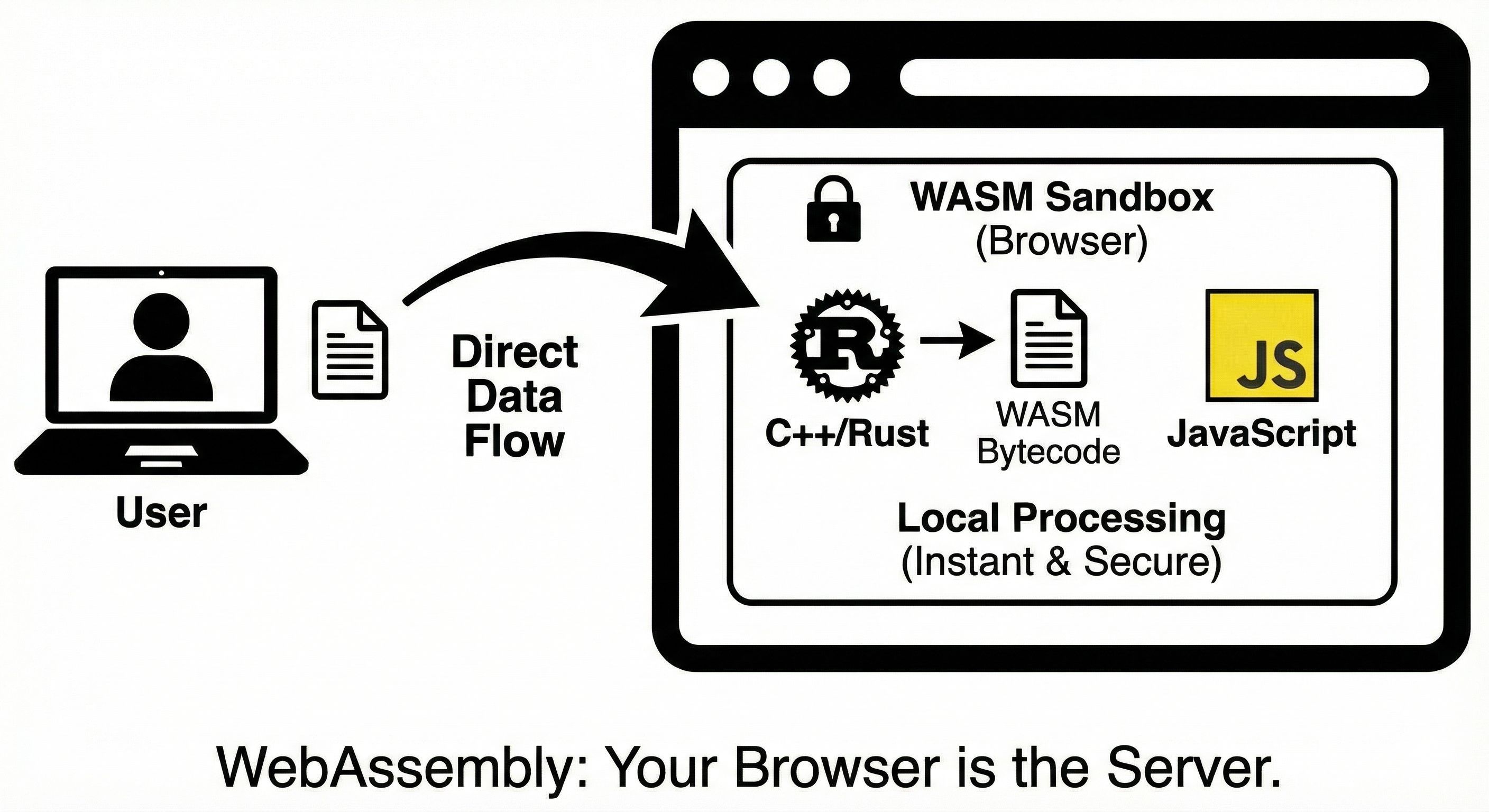
WebAssembly flips the script entirely. Instead of sending your data to the code, WASM sends the code to your data.
WebAssembly is a binary instruction format. It allows developers to write programs in C, C++, Rust, and Go, and compile them into a tiny, hyper-efficient format that your web browser executes directly. When you load a WASM app, your browser downloads the application engine itself. From that moment on, your browser is the server.
When you drop that same 50 MB PDF into a WASM-powered app, here is what happens:
- Local Processing: Your browser processes the file using your device's own CPU and memory.
- Done.
There is no upload. There is no download. There is no queue. The entire operation happens locally on your machine, using tools that rival native desktop applications in performance.
WASM vs. Cloud: The Head-to-Head Comparison
Is WebAssembly Faster Than Cloud Processing?
Yes — for most file processing tasks. Cloud processing is bottlenecked by the network. Your CPU might be able to optimize an image in one second, but uploading it to the cloud takes thirty seconds. WASM apps execute instantly. Because the processing happens locally, the latency is effectively zero. You get the speed of downloaded desktop software with the convenience of a website.
Does WASM Use Less Data Than Cloud Uploads?
Significantly less. Bandwidth costs money — both your mobile data and the developer's server fees. With WASM, the only data you download is the tool itself (usually a few megabytes). After that, you can process gigabytes of data without spending a single byte of network bandwidth. You can even disconnect from Wi-Fi and continue working.
Is WebAssembly More Private Than Cloud Processing?
Completely. When you use cloud processing, you forfeit control of your data. You upload your family photos, financial PDFs, or proprietary company code to a server you don't control.
WebAssembly and browser APIs make local file processing possible. They do not prevent a website or its scripts from accessing the network. Privacy depends on the implementation, the scripts loaded and the data actually transmitted.
Why Is Local Processing the Future?
We spent the last twenty years moving everything into the cloud. Now, WebAssembly is helping bring the important things back down to earth.
Developers love it because they don't have to pay massive server bills to process user data. Users love it because tools are faster, more reliable, and don't require sacrificing privacy. This is why we built Lokaltools. We recognized that utility web apps — format converters, code minifiers, image editors — should not require a round-trip to a server in a data center halfway across the globe.
By leveraging WebAssembly, we give you professional-grade software performance right in your browser. No data collection. No subscriptions to cover server costs. Just pure, unadulterated processing running directly on your own hardware.
Try It Yourself
Reading about WebAssembly is one thing; experiencing the speed and privacy firsthand is another. Stop relying on slow, invasive cloud servers to handle your files.
Head over to the Lokaltools utility suite right now. Try dragging and dropping a large file into one of our converters. Turn off your Wi-Fi immediately after the page loads. Watch as the tool processes your file instantly, proving that your data never leaves your machine. Experience the privacy and performance of 100% client-side, WebAssembly-powered utilities today.
Frequently Asked Questions
What is WebAssembly (WASM)? WebAssembly is a binary instruction format that lets browsers run high-performance code written in languages like C, C++, Rust, and Go. It is a web standard supported by all modern browsers (Chrome, Firefox, Safari, Edge) and enables near-native execution speeds without any plugins.
Is WebAssembly safe to use? Yes. WebAssembly runs inside the browser's existing security sandbox — the same sandbox that isolates all JavaScript. A WASM module cannot access your file system, network, or any system resource unless the JavaScript host code explicitly grants it. In privacy terms, WASM is actually more secure than cloud processing because your data never leaves your device.
Does WebAssembly work offline? Yes. Once the WASM module is downloaded, it can process files completely offline. There is no dependency on a server, so tools continue to work even when your internet connection drops. You can use tools built on WASM entirely without Wi-Fi after the initial page load.
Is WebAssembly faster than JavaScript? For compute-intensive tasks like file compression, encoding, cryptography, and image manipulation, WASM is substantially faster than equivalent JavaScript — often 10–50× faster. For simple DOM manipulation or UI logic, the difference is negligible. WASM excels at the type of heavy processing traditionally reserved for server-side code.
What is the difference between WebAssembly and a normal web app? A normal web app sends your data to a server to be processed; you upload and then download the result. A WebAssembly app downloads the processing engine to your browser and runs everything locally. The key distinction is where the computation happens: on a remote server vs. on your own device.
Can WebAssembly access my files or camera? WebAssembly can only access what the JavaScript host code gives it. If the app uses the browser's File API to load a file you explicitly select, WASM can process that file. It cannot silently read arbitrary files from your disk, access your camera, or make network requests on its own. All permissions still go through standard browser security models.
Why do some tools still use cloud servers instead of WebAssembly? Some tasks genuinely require server-side resources — for example, AI model inference with large models (several gigabytes), tasks requiring access to shared databases, or operations where multiple users need to collaborate on a shared file. For single-user file processing, WASM is almost always the better choice for speed and privacy.