
Video Rotate
Rotate your video files locally using high-performance WASM and metadata injection.
About Video Rotate
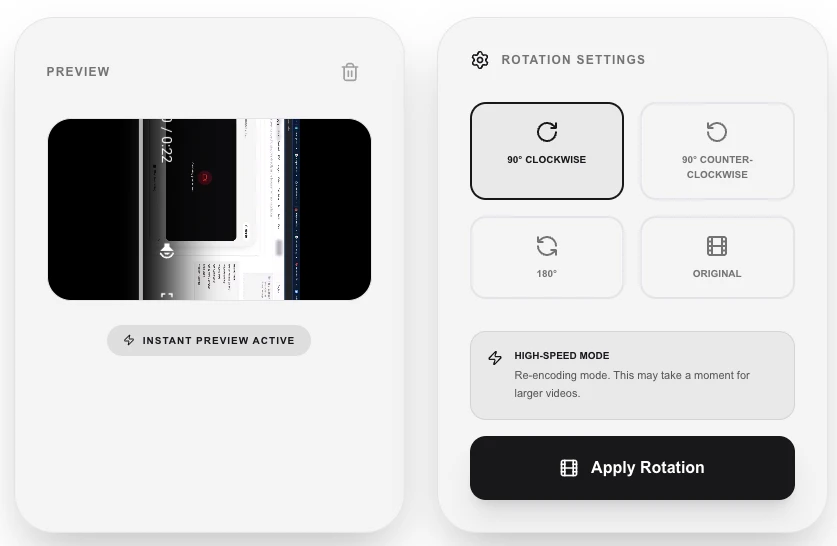
Fix sideways or upside-down videos in seconds. Our video rotation tool uses a smart two-tier approach: for most MP4/MOV files, we use instant metadata injection, and for other formats, we use high-performance WASM processing to ensure your video is perfectly oriented.
How to Use
- Upload the video that needs a rotation fix.
- Select the desired rotation amount (90° CW, 90° CCW, 180°, or 270°).
- Click 'Apply Rotation' to begin the local adjustment.
- Download your correctly oriented video file once the 'Download Result' button appears.
Common Use Cases
- Rotating phone videos captured in the wrong orientation (portrait vs. landscape).
- Fixing drone or action camera footage that was mounted at an angle.
- Correcting mirrors or flipped orientations for creative social media effects.
Technical Details
Prioritizes 'exif' rotation metadata changes for extremely fast processing without re-encoding. Falls back to FFmpeg.wasm for files that require hard-coded frame rotation. 100% on-device.
Frequently Asked Questions
- Does this re-encode the video?
- Only if necessary. For most modern videos, we simply update the metadata flag, which is instant and keeps original quality perfectly.
- Will it work on my 4K video?
- Yes, although metadata-based rotation is instant for 4K, WASM-based re-encoding of 4K files may be slow depending on your device's CPU/RAM.
- Will rotating a video re-encode it and reduce quality?
- The tool uses FFmpeg.wasm to rotate the video. Rotation typically requires a re-encode of the video stream, which can cause a minor quality reduction. Choose a high-quality preset to minimise any loss.
- Can I flip a video horizontally or vertically?
- Video Rotate focuses on 90/180/270-degree rotations. Horizontal and vertical flipping may not be available in this tool — check the Video Converter or Video Editor tools for additional transformation options.
- My phone recorded a video sideways — how do I fix it?
- Upload the sideways video and select 90° clockwise or 90° counter-clockwise depending on which direction it is tilted. Download the corrected video and it will play upright on any device.
- Can I flip a video horizontally or vertically in addition to rotating it?
- Yes. The Video Rotate tool supports 90°, 180°, and 270° rotation as well as horizontal flip (mirror) and vertical flip operations. These can be combined — for example, you can flip horizontally and then rotate 90° in a single operation. Flipping is useful for correcting selfie camera mirror images, creating mirrored video effects, or adjusting footage from drone or action cameras. All transformations are applied via FFmpeg WebAssembly in your browser — no video is uploaded to any server.
Local processing
Our local file, text and chart tools process content on your device using JavaScript, browser APIs and, where needed, WebAssembly. Our usage events do not include filenames, file contents, input text, chart values, raw errors, emails or license references. Network lookup tools (such as DNS, WHOIS, IP and speed tests) contact external services for their stated purpose. Loading the website, fonts, libraries and models also makes network requests. WebAssembly itself does not prevent network access.