
Aspect Ratio Calculator
Calculate aspect ratios and missing dimensions easily.
About Aspect Ratio Calculator
Calculate proportional dimensions for your visual content effortlessly. This tool helps you maintain consistent aspect ratios when resizing images or videos, ensuring your designs never look stretched or distorted.
How to Use
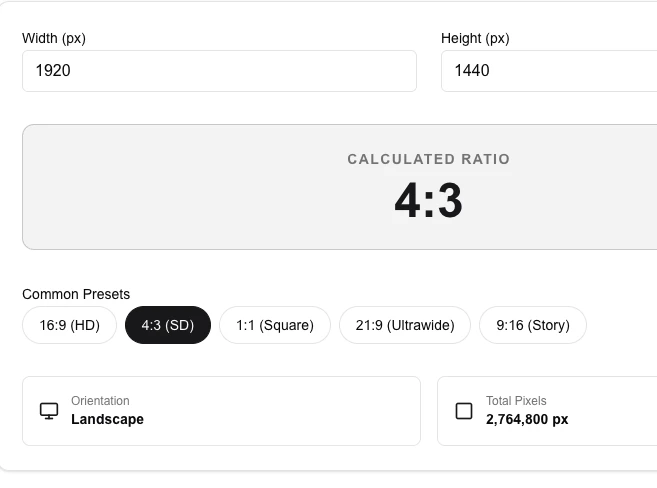
- Enter the width and height to calculate the current ratio.
- Lock one dimension to find the corresponding dimension for a new size.
- Select from 'Common Presets' to quickly find dimensions for standard formats.
- Check the orientation and total pixel count for your resulting size.
Common Use Cases
- Preparing video thumbnails or social media posts with specific requirements.
- Resizing website images while maintaining their original proportions.
- Calculating UI component dimensions for responsive design layouts.
Technical Details
Based on cross-multiplication for dimension scaling and simplification for ratios. All math is performed locally.
Frequently Asked Questions
- What is 16:9 aspect ratio?
- 16:9 is the standard widescreen aspect ratio used for high-definition television and most YouTube videos.
- Does this tool resize the actual image file?
- No, this is a math utility. To resize a file, use our 'Image Resizer' tool.
- How do I find a missing dimension from an aspect ratio?
- Enter the known width or height along with the ratio (e.g. 16:9) and the tool instantly calculates the missing value to maintain the correct proportions.
- Can I simplify a ratio from two arbitrary dimensions?
- Yes. Enter any width and height pair and the tool reduces it to the simplest whole-number ratio using the greatest common divisor.
- What are the most common aspect ratios used in video?
- 16:9 is standard for HD video and most monitors; 4:3 is classic TV; 1:1 is used for social media squares; 9:16 is portrait/mobile video (Instagram Reels, TikTok).
- Can I lock an aspect ratio while resizing an image in another app?
- The Aspect Ratio Calculator does not resize files — it is a math tool that calculates the missing dimension from a known ratio and one given side. Use it to find the exact pixel values you need, then enter those dimensions in your image editor (Photoshop, GIMP, Canva, etc.) with the "constrain proportions" or "lock aspect ratio" option enabled. This workflow prevents accidental stretching or distortion when resizing banners, thumbnails, and social media graphics to platform-specific dimensions.
Local processing
Our local file, text and chart tools process content on your device using JavaScript, browser APIs and, where needed, WebAssembly. Our usage events do not include filenames, file contents, input text, chart values, raw errors, emails or license references. Network lookup tools (such as DNS, WHOIS, IP and speed tests) contact external services for their stated purpose. Loading the website, fonts, libraries and models also makes network requests. WebAssembly itself does not prevent network access.