
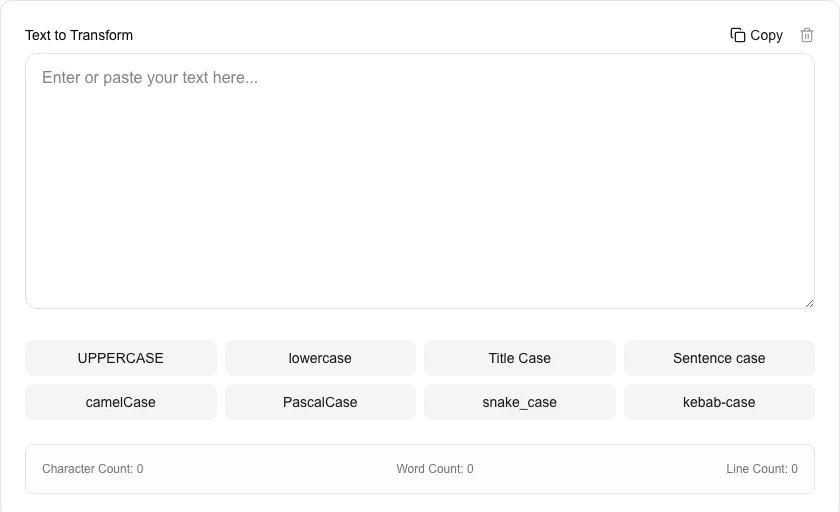
Case Converter
Transform text between uppercase, lowercase, title case, and more.
About Case Converter
Instantly change the case of your text to suit any naming convention or formatting style. Whether you're a programmer needing snake_case or a writer needing Title Case, this tool handles it all locally and securely.
How to Use
- Paste your text into the input area.
- Click any of the case buttons (e.g., camelCase, PascalCase, snake_case) to transform it.
- Monitor real-time statistics like character, word, and line count.
- Copy the transformed text to your clipboard with a single click.
Common Use Cases
- Converting variable names between different programming languages conventions.
- Formatting headlines and titles for blog posts or articles.
- Standardizing user-submitted text for database entries.
Technical Details
Uses standard string manipulation algorithms to detect and transform text patterns. All processing is done client-side for maximum speed and privacy.
Frequently Asked Questions
- What is kebab-case?
- It is a style of writing where words are separated by hyphens (e.g., this-is-kebab-case), often used in URLs and CSS classes.
- Is there a limit on text length?
- The tool can process several megabytes of text easily depending on your browser's performance.
- What is the difference between camelCase and PascalCase?
- In camelCase the first word is lowercase and subsequent words are capitalised (e.g., myVariableName). In PascalCase (also called UpperCamelCase) every word starts with a capital letter (e.g., MyVariableName). PascalCase is commonly used for class names; camelCase for variables and functions.
- When should I use snake_case vs kebab-case?
- snake_case (words joined by underscores) is conventional in Python variables, database column names, and file names. kebab-case (words joined by hyphens) is used in URLs, CSS class names, and HTML attributes. Neither is better — follow your language or framework convention.
- Does case conversion handle non-English characters?
- JavaScript's built-in toUpperCase and toLowerCase methods correctly handle most Unicode characters including accented letters. For example, 'ñ' uppercases to 'Ñ'. Edge cases may exist for languages with context-sensitive casing rules like Turkish (i → İ).
- Does the case converter handle accented or non-Latin characters?
- Yes. The Case Converter uses the JavaScript toUpperCase() and toLowerCase() methods with Unicode support, so accented characters like é, ñ, ü, ç, and most Latin-extended letters are converted correctly. Characters from scripts that do not have a case distinction — such as Arabic, Hebrew, Chinese, Japanese, and Korean — are passed through unchanged. Title Case capitalization follows English word-boundary rules, so results for non-English text may not match language-specific capitalization conventions.
Local processing
Our local file, text and chart tools process content on your device using JavaScript, browser APIs and, where needed, WebAssembly. Our usage events do not include filenames, file contents, input text, chart values, raw errors, emails or license references. Network lookup tools (such as DNS, WHOIS, IP and speed tests) contact external services for their stated purpose. Loading the website, fonts, libraries and models also makes network requests. WebAssembly itself does not prevent network access.