
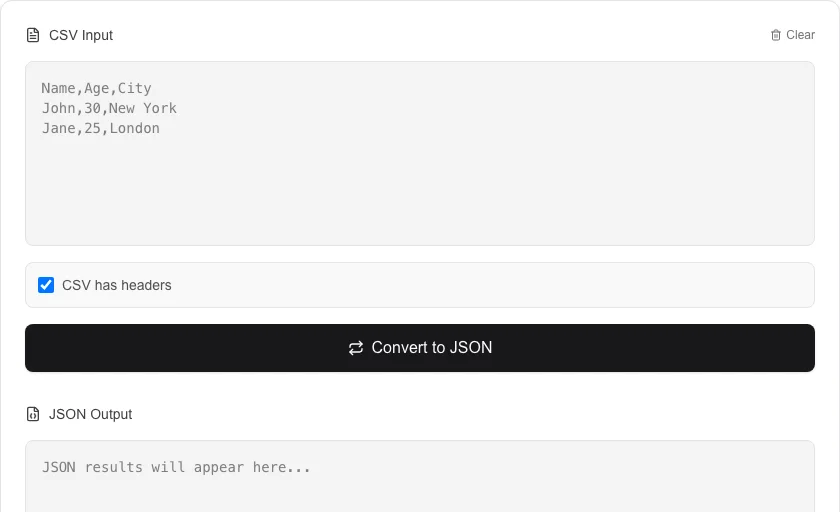
CSV to JSON Converter
Convert CSV data to JSON objects instantly.
About CSV to JSON Converter
Transform structured CSV data into clean, readable JSON. This tool is perfect for developers and data analysts who need to convert spreadsheet data into a format compatible with modern APIs and web applications.
How to Use
- Paste your CSV data into the input box.
- Check 'CSV has headers' if your data includes a header row.
- Click 'Convert to JSON' to process the data.
- Download the resulting JSON file or copy it to your clipboard.
Common Use Cases
- Importing spreadsheet data into a MongoDB or NoSQL database.
- Creating mock data for API development from Excel outputs.
- Mapping bulk data for use in JavaScript applications.
Technical Details
Uses PapaParse for robust, high-performance CSV parsing directly in the browser, ensuring support for large files and complex delimiters.
Frequently Asked Questions
- Does it handle different delimiters?
- Yes, our tool automatically detects commas, tabs, and semicolons for seamless conversion.
- Can I convert large files?
- Since processing happens locally on your machine, performance depends on your device, but it can handle thousands of rows efficiently.
- How do I convert a CSV file with headers to a JSON array of objects?
- Upload or paste your CSV — if your file has a header row, enable the 'Use first row as keys' option. Each subsequent row becomes a JSON object where the keys are the column headers. The result is a JSON array of those objects.
- Can I convert a semicolon-delimited or tab-delimited file?
- Yes. The tool lets you specify a custom delimiter — enter a semicolon (;), tab (\t), pipe (|), or any other character. This makes it compatible with European CSV formats and TSV files exported from spreadsheet apps.
- Does the CSV to JSON converter work with quoted fields containing commas?
- Yes. The parser correctly handles RFC 4180-compliant CSV, including fields wrapped in double quotes that contain commas, newlines, or escaped quotes. For example, "Smith, John" is parsed as a single field value.
- Does the CSV to JSON converter handle multi-line fields with embedded newlines?
- Yes. The parser follows RFC 4180, so fields wrapped in double quotes that contain line breaks, commas, or quotes are handled correctly. For example, a cell containing "Line 1 Line 2" enclosed in quotes will become a single JSON string value with an embedded newline character (\n). If your CSV uses a non-standard delimiter such as semicolons or pipes, you can specify the delimiter before converting. All processing happens in your browser — no data is uploaded.
Local processing
Our local file, text and chart tools process content on your device using JavaScript, browser APIs and, where needed, WebAssembly. Our usage events do not include filenames, file contents, input text, chart values, raw errors, emails or license references. Network lookup tools (such as DNS, WHOIS, IP and speed tests) contact external services for their stated purpose. Loading the website, fonts, libraries and models also makes network requests. WebAssembly itself does not prevent network access.