
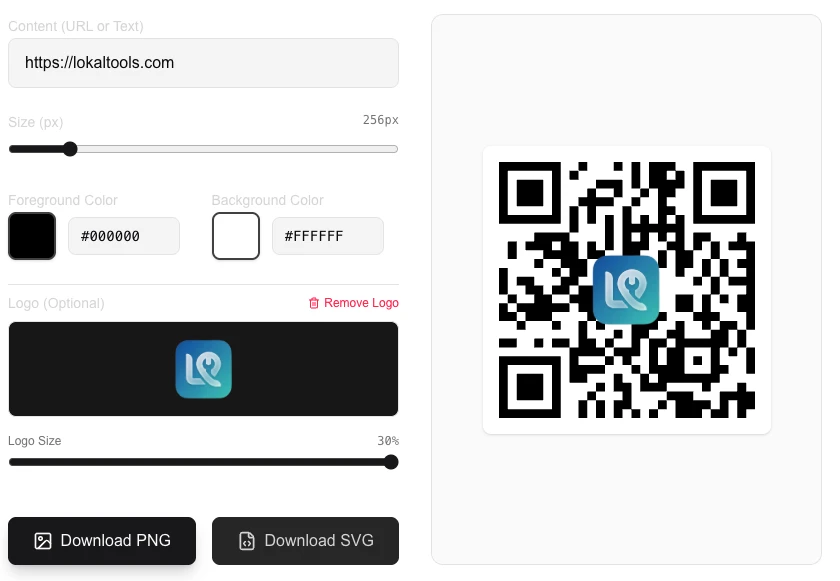
QR Code Generator
Create custom QR codes for links or text.
About QR Code Generator
Generate custom QR codes for any website URL or text string. Perfect for sharing links, contact information, or promotional content, our tool creates high-quality codes ready for scanning on any mobile device.
How to Use
- Paste the URL or text you want to encode into the input field.
- Optionally upload a logo to appear in the center of the QR code.
- The QR code will generate instantly in the preview area.
- Verify the code with your phone's camera to ensure it works correctly.
- Click 'Download QR Code' to save the image as a PNG file.
Common Use Cases
- Sharing website links on printed posters, flyers, or business cards.
- Providing quick access to Wi-Fi passwords or digital menus.
- Encoding contact details for easy 'Scan to Add' functionality.
Technical Details
Uses high-reliability QR encoding libraries to generate a matrix of modules with error correction, ensuring playability even if the code is slightly damaged.
Frequently Asked Questions
- Can I edit the code later?
- No, QR codes are static representations of data. If you change the URL, you need to generate and download a new code.
- Is there a character limit?
- Standard QR codes can hold several thousand characters, though shorter strings result in simpler, more scan-friendly codes.
- What size should a QR code be for print?
- For most print uses, a minimum of 2 cm × 2 cm at 300 DPI works reliably. The more data encoded, the denser the QR code becomes — use shorter URLs or a URL shortener to keep scan distance reasonable.
- Can I change the color of a QR code?
- Yes, but maintain high contrast between the foreground and background — dark on light always scans more reliably than light on dark. Avoid using similar shades or gradients that reduce contrast ratio.
- How much data can a QR code hold?
- A standard QR code can store up to about 4,296 alphanumeric characters or 2,953 bytes of binary data. In practice, keeping encoded content short (a URL under 100 characters) produces a less dense code that scans faster.
- Does this tool generate dynamic QR codes that can be updated after printing?
- No. This tool generates static QR codes. A static QR code encodes the destination URL or data directly into the pattern — once printed, the content cannot be changed. Dynamic QR codes (offered by paid services like Bitly or QR Tiger) use a short redirect URL that can be updated without reprinting. For permanent use cases like business cards, product packaging, and posters, static QR codes are perfectly reliable. For marketing campaigns where you may want to change the destination, a dynamic QR code service is a better choice.
Local processing
Our local file, text and chart tools process content on your device using JavaScript, browser APIs and, where needed, WebAssembly. Our usage events do not include filenames, file contents, input text, chart values, raw errors, emails or license references. Network lookup tools (such as DNS, WHOIS, IP and speed tests) contact external services for their stated purpose. Loading the website, fonts, libraries and models also makes network requests. WebAssembly itself does not prevent network access.
Why You Should Generate QR Codes Locally (Not with a Free Online Generator)
Generating QR codes locally means encoding your data directly into an image inside your browser, with no server involved. The resulting code is static and permanent — it will never expire, redirect through a third party, or track the people who scan it.
What Is the Hidden Cost of a "Free" QR Code Generator?
Let's talk about the dirty secret of the QR code industry.
You need a simple QR code for a restaurant menu, a Wi-Fi password, or a business card. You search for a free generator online, paste your URL, download the image, and send it to the printers. Three months later, a customer scans your beautiful new menu — and instead of your website, they see a blank page that says "Trial Expired. Upgrade to Pro."
What happened? You fell for the dynamic redirect trap.
We built LokalTools to give users an alternative to exactly this kind of bait-and-switch. Here is how the industry tricks you, how static generation actually works at the technical level, and why moving the entire process into your local browser is the safest approach.
How Do "Free" QR Code Services Actually Track Your Users?
Most online barcode and QR generators do not encode your data directly into the image. Instead, they encode a shortlink pointing to their own servers.
When a user scans your code, here is the actual data pipeline:
- The Scan: The phone reads the code and opens a link like
qr-tracker-service.com/id=9384. - The API Ping: The server receives the request. It logs the user's IP address, device type, operating system, and geographic location.
- The Redirect: After harvesting that data, the server finally redirects the user to your actual destination.
This is a significant privacy leak. Your users are being tracked without their consent, and you never agreed to that on their behalf. Worse, you do not own the code — you are renting a redirect on someone else's server. When they change their pricing model or shut down entirely, your printed materials instantly become worthless.
How Does a QR Code Actually Work? (It Is Just Math)
A QR code is a physical data container. The black and white shapes represent binary data — your text is literally encoded in the pattern of squares.
If you encode the string "https://lokaltools.com", that literal text is converted into the matrix. The translation from text to image requires zero internet connection.
Here is what happens during generation:
- Data Analysis and Mode Selection: The algorithm analyzes your text to determine the most efficient encoding method: numeric, alphanumeric, byte, or kanji.
- Error Correction Coding: This is the magic of QR codes. They use Reed-Solomon error correction, which adds redundant backup data into the image. This is why a QR code with a logo slapped in the center, or a scuffed code on a table, still scans perfectly.
- Matrix Placement: The binary data is placed into the grid, adding finder patterns (the large squares in the corners) so the scanner knows orientation.
All of this is pure, deterministic mathematics. Sending this raw string to a cloud server to do the math makes no technical sense whatsoever.
Bringing QR Code Generation to the Browser
At MLOGICTECH, we believe in keeping your data on your device. By leveraging modern JavaScript and WebAssembly (WASM), we ported robust encoding libraries directly into the browser.
When you use our tool, you type in your data, and your local CPU calculates the Reed-Solomon equations and paints the pixel matrix directly onto an HTML5 canvas. no file uploads are made. No server ever sees the text you are encoding.
From the Developer's Desk: Why QR Codes Looked Blurry on Retina Screens
Building this entirely on the client side sounded straightforward — math in, image out. But when I first prototyped the barcode and QR generator for LokalTools, we hit a frustrating rendering problem.
The logic was correct, but the visual output was poor. On standard 1080p monitors, QR codes looked fine. But on MacBook Retina displays or modern high-density smartphone screens, the edges of the QR squares looked blurry and smudged.
The problem: HTML5 <canvas> elements render based on CSS pixels, not physical device pixels. A Retina display packs multiple physical pixels into each CSS pixel. When we painted a 200×200 pixel QR code onto a 200×200 CSS canvas, the high-density screen tried to upscale it, applying anti-aliasing to the sharp edges. This created a fuzzy image that phone cameras struggled to parse quickly. The problem was even worse for 1D barcodes like Code 128, where exact pixel widths determine whether a laser scanner can read the code at all.
The fix: we rewrote the rendering engine to respect device pixel ratios. We read window.devicePixelRatio at runtime. On a Retina screen (2× ratio), the generator creates an internal canvas at 400×400 pixels, paints the barcode at that mathematically exact resolution, and then uses CSS to force the visual display back down to 200×200. In our testing across Retina MacBooks, Android flagships, and budget phones, every generated code scanned instantly on the first try.
When Does the Cloud Actually Win?
Client-side generation is faster and more private, but it is not the right solution for every scenario.
If you are a marketing agency running a nationwide physical ad campaign, you might genuinely need dynamic QR codes. If you print 10,000 posters with a static, locally generated QR code, you cannot change that destination URL after the fact. If you need to redirect traffic from a summer promo to a winter promo, you are stuck.
Dynamic, server-side codes allow you to change the destination long after the ink has dried. They also provide scan analytics — how many people scanned your code, when, and where.
If you need editability and analytics, a server-side redirect system is the right tool. But if you want absolute privacy, permanence, and instant generation, local static codes are the only way to go.
Try It Yourself
Stop letting third-party APIs hijack your links and build shadow profiles on the people scanning your codes. Keep your data private and ensure your printed materials never expire.
Head over to the LokalTools QR & Barcode Generator. Type in your Wi-Fi password, your contact details, or your website URL. Watch your own local hardware calculate the math and render the image instantly, entirely offline.
Frequently Asked Questions
Why do free QR code generators expire? Most free generators create dynamic QR codes that redirect through their servers. The actual URL encoded in the image is the generator's own shortlink. When the company ends a free tier, limits usage, or shuts down, that shortlink stops working — and so does your code.
Can a QR code really be generated without internet? Yes. QR code generation is a mathematical encoding process that runs entirely on your device. Once the LokalTools page has loaded, you can disconnect from the internet and continue generating codes. No server is involved at any point.
Are locally generated QR codes permanent? Yes. A static QR code encodes your data directly into the image. It will work forever as long as the image exists. There is no server, no subscription, and no expiry date.
Do QR codes track who scans them? Static QR codes do not track anything — they are just images with encoded data. Dynamic QR codes (the kind most free services generate) do track scan events, including IP address, device, and location. Local generation produces static codes with zero tracking.
What types of data can I encode in a QR code? The LokalTools QR generator supports URLs, plain text, Wi-Fi credentials, contact information (vCard), email addresses, phone numbers, and SMS messages. Any text string up to approximately 4,000 characters can be encoded.
What is the difference between a QR code and a barcode? A QR code (Quick Response code) is a 2D matrix that can store up to several thousand characters. A traditional barcode (such as Code 128 or EAN-13) is a 1D linear pattern that stores a shorter numeric or alphanumeric string. Both are supported by the LokalTools generator.
Is it safe to generate QR codes containing passwords or private data? With a local generator like LokalTools, yes — your data never leaves your browser. With a cloud-based generator, no — your data is transmitted to a third-party server and you have no control over how it is stored or used.