
User Agent Parser
Parse and analyze user agent strings for browser and OS info.
About User Agent Parser
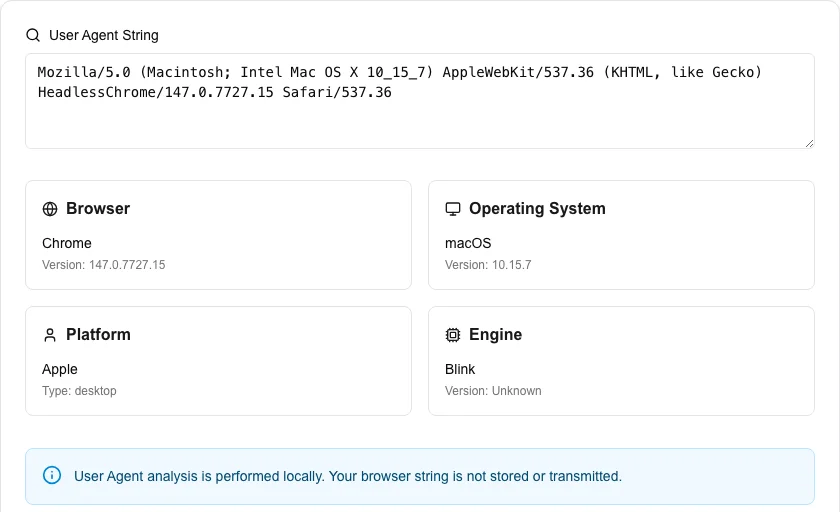
Deconstruct and analyze any user agent string to identify browser, operating system, and device details. This tool is essential for web developers debugging compatibility issues or security analysts investigating web traffic patterns.
How to Use
- Instantly view details of your own browser in the 'Your current User Agent' section.
- Paste any other user agent string into the search box to analyze it.
- Click 'Parse User Agent' to see a detailed breakdown of the software and hardware used.
- Review the Browser, OS, and Engine versions to identify potential compatibility gaps.
Common Use Cases
- Debugging why a website renders differently for a specific mobile user.
- Analyzing server logs to identify the versions of browsers visiting your site.
- Verifying that your application's device detection logic works correctly across various strings.
Technical Details
Uses high-performance parsing logic to identify patterns and version numbers within standard HTTP user-agent header formats. 100% local processing.
Frequently Asked Questions
- What is a User Agent?
- A User Agent is a string of text that a browser sends to a website to identify itself and its capabilities.
- Are the results always accurate?
- While we use updated libraries, some browsers can 'spoof' their user agent string to hide their true identity.
- What is a User-Agent string?
- A User-Agent string is a text identifier sent by browsers and HTTP clients in request headers. It tells the server what browser, rendering engine, operating system, and device made the request. Example: 'Mozilla/5.0 (iPhone; CPU iPhone OS 17_0)...'
- Where can I find my browser's User-Agent string?
- Open your browser's developer tools (F12), go to the Network tab, reload any page, click a request, and look at the Request Headers section for the User-Agent field. Alternatively, search 'what is my user agent' in Google.
- Why do all browsers start their User-Agent with 'Mozilla/5.0'?
- This is a historical quirk. Early browsers used compatibility strings to receive pages intended for Netscape (Mozilla). The pattern stuck and has been preserved for backward compatibility even though it no longer describes the actual browser.
- Can I test how my website detects browsers by providing a custom User-Agent string?
- Yes. In addition to auto-detecting your current browser's User-Agent, the tool accepts any custom string you paste in. This is useful for testing how your server-side or JavaScript User-Agent detection logic would interpret a specific browser, bot, or mobile device. Paste the User-Agent from a different browser, a Googlebot crawler, or any device you want to simulate and the parser will break it down into browser name, engine, OS, and device type — all processed instantly in your browser.
Local processing
Our local file, text and chart tools process content on your device using JavaScript, browser APIs and, where needed, WebAssembly. Our usage events do not include filenames, file contents, input text, chart values, raw errors, emails or license references. Network lookup tools (such as DNS, WHOIS, IP and speed tests) contact external services for their stated purpose. Loading the website, fonts, libraries and models also makes network requests. WebAssembly itself does not prevent network access.