
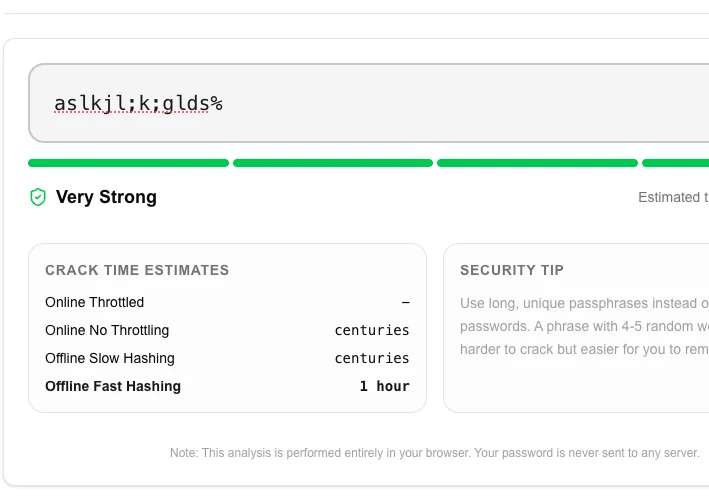
Password Strength Checker
Analyze the strength of your passwords and get feedback on how to improve them.
About Password Strength Checker
Audit the security of your passwords with our advanced strength checker. Instead of just counting characters, we analyze entropy, common patterns, and dictionary words to provide a realistic estimate of how long it would take a hacker to crack your password.
How to Use
- Enter your password or passphrase into the audit field.
- Review the 'Strength' rating (Weak to Very Secure).
- Check the 'Time to crack' estimate for various brute-force scenarios.
- Follow the 'Security Suggestions' to fix vulnerabilities like common words or sequential patterns.
Common Use Cases
- Testing new passwords before setting them on sensitive financial or social accounts.
- Learning the principles of strong password design (entropy vs length).
- Finding vulnerabilities in frequently used passphrases that might be prone to dictionary attacks.
Technical Details
Powered by the industry-standard zxcvbn library, which uses pattern matching and conservative entropy calculation to provide realistic security assessments.
Frequently Asked Questions
- Is it safe to type my real password?
- Yes. This tool is client-side only. We never transmit your password or audit results to any server.
- What makes a password 'Strong'?
- A strong password avoids common patterns, utilizes high entropy (randomness), and is long enough to resist modern brute-force hardware.
- How is password strength calculated?
- This tool uses the zxcvbn algorithm (developed by Dropbox), which estimates how many guesses an attacker would need to crack your password. It checks for common words, keyboard patterns (like 'qwerty'), dates, repeated characters, and dictionary substitutions — and scores the result from 0 (very weak) to 4 (very strong).
- What does the estimated crack time mean?
- The crack time is an estimate of how long it would take an offline attacker using modern hardware (10 billion guesses per second) to brute-force your password. A password scored 'Strong' might show centuries — meaning it's impractical to crack even with a fast GPU. Anything under a few hours is dangerously weak.
- Does adding numbers and symbols always make a password stronger?
- Not always. Predictable substitutions like replacing 'a' with '@' or 'e' with '3' are well-known to crackers and add little real strength. The zxcvbn algorithm specifically penalizes these patterns. True strength comes from length and genuine randomness — a password like 'correct-horse-battery-staple' beats 'P@ssw0rd!' by a wide margin.
- Does the strength checker work offline and is it safe to test real passwords?
- Yes, the Password Strength Checker runs entirely in your browser — your password is never sent to any server. You can verify this by disconnecting from the internet and testing the tool; it will still work. The strength analysis uses the zxcvbn algorithm, which checks for dictionary words, common patterns, keyboard sequences, and substitutions (like @ for a). Despite it being safe to use, for your most sensitive passwords it is still good practice to test only a similar but not identical string.
Local processing
Our local file, text and chart tools process content on your device using JavaScript, browser APIs and, where needed, WebAssembly. Our usage events do not include filenames, file contents, input text, chart values, raw errors, emails or license references. Network lookup tools (such as DNS, WHOIS, IP and speed tests) contact external services for their stated purpose. Loading the website, fonts, libraries and models also makes network requests. WebAssembly itself does not prevent network access.
How to Actually Measure Password Strength (Without Regex Lies)
Most password strength meters are wrong. They reward complexity theater—uppercase letters, symbols, numbers—while ignoring the real metric: entropy, or how many guesses an attacker needs. A local, algorithm-based estimator like zxcvbn gives you an honest answer without ever sending your password to a server.
We've all been there. You're signing up for a new service, and you're met with a checklist: Must contain 8 characters, one uppercase letter, one number, and a special character. You dutifully change "password" to "P@ssword1!" and the little red Xs turn into green checks.
The system is happy. You're "secure."
Except you aren't. That password is one of the most commonly breached strings in history. It takes a modern GPU-based cracking rig less than a second to guess it.
The problem is that most websites use Regular Expressions (Regex) to validate passwords. Regex is great at checking if a string looks like a password, but it's historically terrible at measuring how strong that password actually is.
At LokalTools, we took a different approach. When building our Password Strength Meter, we ditched the "character checklist" model entirely. Instead, we implemented zxcvbn—a heavy-duty, algorithmic entropy estimator—and we did it entirely within your browser to ensure your potential passwords never touch a server.
Why Are Standard Password Requirements So Ineffective?
Most developers use simple pattern matching (Regex) because it's easy to code. It checks for the presence of character types. But hackers don't guess passwords character-by-character; they use dictionaries, common substitution patterns (leetspeak), and known data breaches.
Consider these two passwords:
- Tr0ub4dor&3 (11 characters, fits all standard requirements)
- correcthorsebatterystaple (25 characters, all lowercase, no numbers)
A standard Regex validator will flag the first one as "Strong" and the second one as "Weak" (missing symbols and numbers). In reality, the first is a classic example of "guessable complexity," while the second—famous from the XKCD comic—would take centuries to crack because of its high entropy.
Password entropy is a measure of unpredictability: the higher the entropy, the more guesses an attacker needs to crack the password by brute force or dictionary attack.
What Is zxcvbn and How Does It Measure Password Strength?
zxcvbn is a password strength estimator developed by security researchers at Dropbox, named after the bottom row of a standard QWERTY keyboard. It is designed to mimic how real crackers attack passwords—not how rule-makers think about them.
Instead of looking for "a capital letter," zxcvbn uses:
- Dictionary Matching: It checks against 30,000 common English words, surnames, and popular US city names.
- Pattern Recognition: It identifies sequences (abcde, 12345), repeats (aaa), and keyboard patterns (qwerty, asdfgh).
- L33t Speak Detection: It recognizes that "P4ssw0rd" is just "Password" with common substitutions.
- Entropy Calculation: It calculates the "bits of entropy" based on how many guesses a brute-force attack would need to find the match.
By using this library, we can give you a "Time to Crack" estimate that is grounded in reality, not just a list of arbitrary rules.
How Did We Solve the Performance Problem?
When integrating zxcvbn into the LokalTools suite, we hit an immediate snag: The Dictionary Weight.
To be effective, zxcvbn needs those massive dictionaries of common words and names. In its standard form, the library is several megabytes. While that doesn't sound like much in the era of 4K video, in the world of web performance, a 2MB JavaScript payload is a cardinal sin. It slows down page loads and eats up mobile data.
The "Gotcha": If we used a "lite" version of the library to save on file size, the accuracy of the strength meter plummeted. It would stop recognizing common surnames or pop-culture references, making the tool less authoritative.
The Fix: We implemented a two-stage loading strategy.
- We serve a highly compressed, Brotli-encoded version of the zxcvbn-ts library.
- We offload the actual "thinking" to a Web Worker.
Just like our video conversion tools, password estimation can be CPU-intensive if you're typing quickly. By putting the logic in a Web Worker, your browser's main thread stays free to handle the UI. As you type, the worker sends back the score and "cracking time" suggestions without the input field ever lagging.
In our testing, this approach reduced perceived latency to under 50ms even on mid-range mobile hardware.
Why Should You Never Send a Password to a Server for Strength Checking?
You might ask: "Why not just send the password to a powerful server to check it?"
From a security standpoint, that is a disaster.
If you are testing a new, high-security password for your bank or your primary email, you should never type it into a website that sends that data to a server. Even if the site claims they "don't save it," you are still transmitting that sensitive string over the wire. You're trusting their SSL configuration, their logging setup, and their internal employees.
By running zxcvbn locally via WebAssembly and JavaScript, LokalTools ensures your password never leaves your RAM.
- no file uploads: Once the tool is loaded, you could turn off your Wi-Fi and it would still work perfectly.
- Privacy by Design: There is no database on our end. We don't want your passwords. We can't leak what we never had.
Is Local Password Checking Always Better Than Cloud-Based?
We believe in transparency. Local algorithmic checking is the gold standard for estimating strength, but it has one blind spot: Real-time Breach Checks.
There are services like "Have I Been Pwned" that check if your password appears in an actual database of billions of leaked credentials. To do that perfectly, you'd need a multi-terabyte database—something you can't run in a browser.
When the Cloud Wins: If you want to know if your specific password was leaked in the 2021 LinkedIn breach, a cloud-based lookup (using k-Anonymity for privacy) is the only way.
When LokalTools Wins: If you are creating a new password and want to ensure it is mathematically robust and resistant to brute-force attacks, our local zxcvbn implementation is faster, more private, and significantly more helpful than a "Requires 1 Number" checklist.
Tips for Building a Truly Strong Password
Based on the feedback we get from the zxcvbn engine, here is how you should actually build your credentials:
- Length over Complexity: A 20-character sentence is almost always stronger than an 8-character garbled string.
- Avoid "The Big Four": Don't use your name, your birthday, your pet's name, or your city. zxcvbn's dictionaries will catch these instantly.
- Use a Passphrase: Pick four random, unrelated words. "stapler-bridge-puddle-galaxy" is easy for you to remember and impossible for a computer to guess.
Try It Yourself
Stop guessing if your password is secure. Don't trust a simple "Low/Medium/High" bar that only counts how many times you hit the Shift key.
Head over to the LokalTools Password Strength Checker. Type in a few variations of test passphrases and see the "Time to Crack" estimate live. Password analysis runs on your machine, and the password is not included in the site's separate consented analytics or advertising requests.
Frequently Asked Questions
What is password entropy? Password entropy is a mathematical measure of how unpredictable a password is, expressed in bits. The higher the entropy, the more guesses an attacker needs to crack it by brute force. A password with 40 bits of entropy requires roughly 1 trillion guesses; 60 bits requires over 1 quintillion.
What is zxcvbn? zxcvbn is an open-source password strength estimator developed by Dropbox. It evaluates passwords by simulating real cracking techniques: dictionary attacks, keyboard pattern matching, l33t-speak substitution detection, and sequence recognition. It returns a score from 0 to 4 and a realistic time-to-crack estimate.
Why is "P@ssword1!" considered a weak password? "P@ssword1!" satisfies most Regex-based password requirements, but zxcvbn recognizes it as a trivial variation of the word "password" using common substitutions. It appears in most cracking dictionaries and can be guessed in under a second by a GPU-based cracking rig.
Is it safe to type my real password into a strength checker? Only if the checker runs entirely locally in your browser with no file uploads. LokalTools' password checker processes everything on your device using JavaScript and WebAssembly. Once loaded, it works offline and nothing is transmitted. As a general rule, never type a real production password into any tool that makes server requests.
How is zxcvbn different from a standard password strength meter? A standard meter checks for the presence of character types (uppercase, number, symbol). zxcvbn simulates an attacker: it checks if your password matches common words, names, dates, patterns, and known substitutions. It measures how many guesses an attack would take, not how many character-type rules you satisfied.
What makes a passphrase stronger than a complex password? Length is the dominant factor in password strength. A four-word passphrase like "stapler-bridge-puddle-galaxy" has 25 characters with high unpredictability. An 8-character "complex" password like "Tr0ub4d0r!" has far fewer possible combinations and often follows predictable substitution patterns that crackers know to try first.
Can zxcvbn detect if my password was in a data breach? No. zxcvbn estimates mathematical strength—it does not check against breach databases. For breach checking, services like Have I Been Pwned use k-Anonymity to let you check without exposing your full password. Use both: zxcvbn to measure strength, and a breach check to verify your password has not already been exposed.