
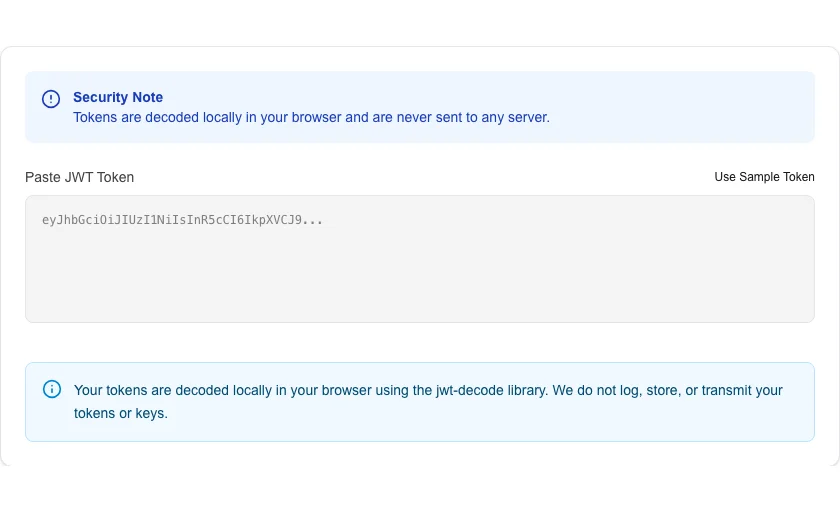
JWT Decoder
Decode JSON Web Tokens (JWT) to view their header and payload.
About JWT Decoder
Decode and analyze JSON Web Tokens (JWT) instantly and securely. This tool allows developers to inspect the header, payload, and signature components of a JWT without needing a secret key or exposing sensitive data to a server.
How to Use
- Paste your encoded JWT into the token input field.
- The tool will automatically parse the string into its component parts.
- Review the Header and Payload sections for decoded JSON data.
- Use the 'Copy' buttons to save individual sections for debugging.
Common Use Cases
- Checking the expiration (exp) and issued-at (iat) timestamps of a token.
- Verifying user claims and roles embedded in a payload.
- Debugging authentication flows in web and mobile applications.
Technical Details
Implements the standardized JWT decoding logic locally using JavaScript. Supports JWS (signed tokens) and displays raw JSON structures for easy inspection.
Frequently Asked Questions
- Can I verify the signature here?
- This is a decoder, not a validator. Signature verification requires your private/public key, which we do not ask for to ensure your security.
- Is my token safe?
- Yes. Decoding happens 100% client-side. Your token never leaves your browser.
- What are the three parts of a JWT?
- A JWT consists of three Base64URL-encoded segments separated by dots: the Header (algorithm and token type), the Payload (claims such as user ID and expiry), and the Signature (used to verify the token hasn't been tampered with).
- Is it safe to paste a JWT into an online decoder?
- Our decoder runs entirely in your browser — your token is never sent to a server. However, as a best practice, avoid pasting production tokens with sensitive claims into any online tool. Use test or development tokens for debugging.
- What is the difference between HS256 and RS256 in a JWT?
- HS256 uses a shared secret key for both signing and verifying (symmetric). RS256 uses a private key to sign and a public key to verify (asymmetric). RS256 is preferred for public APIs because the verifier never needs the private key.
- Can I decode a JWT token that uses RS256 or ES256 asymmetric signing?
- Yes. Decoding a JWT only requires base64url-decoding the header and payload sections — the signing algorithm does not affect readability. You can decode tokens signed with any algorithm (HS256, RS256, ES256, PS256, etc.) to read the claims inside. Signature verification is a separate step: HS256 requires the shared secret, while RS256 and ES256 require the public key. The tool can optionally verify HS256 signatures if you provide the secret; asymmetric signature verification is not currently supported in the browser tool.
Local processing
Our local file, text and chart tools process content on your device using JavaScript, browser APIs and, where needed, WebAssembly. Our usage events do not include filenames, file contents, input text, chart values, raw errors, emails or license references. Network lookup tools (such as DNS, WHOIS, IP and speed tests) contact external services for their stated purpose. Loading the website, fonts, libraries and models also makes network requests. WebAssembly itself does not prevent network access.
How to Decode JWTs Locally Without Leaking Your Tokens
You can decode and verify a JWT entirely inside your browser without sending a single byte to an external server. A local WASM-powered decoder parses the header, payload, and signature in milliseconds—keeping your tokens, your user data, and your internal system architecture completely private.
We have all done it. You are debugging an authentication flow, you grab that massive string from your browser's network tab, and you drop it into the first search result for "JWT decoder."
Boom. Instantly, you see the header, the payload, and your user claims neatly formatted in JSON. It solves your immediate problem. You fix the bug, close the tab, and move on.
But here is the ugly truth about that workflow: you just handed over a live, potentially valid access token to a third-party server you know nothing about.
JSON Web Tokens (JWTs) are the backbone of modern stateless authentication. They carry user identities, roles, and internal system architectures. Pasting them into random online utilities is a massive security blind spot.
At MLOGICTECH, we realized this was a glaring hole in the standard developer toolkit. We set out to build a completely private alternative for LokalTools.
Here is exactly why pasting proprietary JWTs online is dangerous, how the token structure tricks developers into complacency, and how we engineered a browser-only decoder and verifier.
Why Do Developers Paste JWTs Into Online Tools?
Developers usually know better than to paste a raw database password into a random website. So why do we treat JWTs differently?
It comes down to how they look.
A JWT is a long string of seemingly random alphanumeric characters divided by two periods. It looks like high-grade encryption. It feels safe to share because it resembles a cryptographic hash.
That is an illusion.
JWTs are strictly composed of three parts:
- The Header: Declares the token type and the signing algorithm (like HMAC SHA256 or RSA).
- The Payload: Contains the "claims" or the actual data (user IDs, emails, admin flags).
- The Signature: A mathematical guarantee that the token has not been tampered with.
The catch? The header and the payload are not encrypted. They are simply Base64Url encoded. Anyone with a basic scripting terminal can decode them instantly using standard built-in functions.
When you paste a token into a cloud-based decoder, you are exposing the raw payload. Even if the token does not contain a password, it often contains Personally Identifiable Information (PII) like email addresses, internal UUIDs, and granular permission architectures.
What Are the Real Risks of Cloud-Based JWT Decoders?
Traditional cloud-based developer tools operate on a simple model: send us your data, we will process it, and we will return the result.
When you use a remote JWT decoder, you face several severe risks:
- Server Logging: The server hosting the tool might be logging every request. That means your live production tokens are now sitting in plain text in an S3 bucket or a database owned by someone else.
- Analytics Interception: Many free tools monetize through aggressive tracking. Your token might get scraped by analytics scripts running on the page before it even hits the decoding backend.
- The "Expired Token" Fallacy: Developers often think, "It's fine, the token expired an hour ago." An expired token still reveals your database schema, your role-naming conventions (e.g.,
role: super_admin), and your internal routing structure. You are mapping out your application's weak points for an attacker.
In our testing, several popular "free" JWT decoder sites make outbound requests on every paste event. Your token travels to at least one server you did not choose.
How Does Local JWT Verification Actually Work?
When we started building the LokalTools JWT Decoder, the initial goal was simple: do it 100% locally.
Decoding the Base64Url payload is trivial. A few lines of JavaScript handle that instantly without any network requests. But a good JWT tool does not just decode; it verifies the signature to ensure the token is actually valid.
This is where we hit a massive wall.
To verify a token's signature locally, you need a robust cryptographic library. Most developers rely on server-side libraries like Node's crypto module. Browsers do have the native Web Crypto API, but relying on it for complex, edge-case JWT algorithms across different browser engines became a nightmare. We found inconsistent support for specific elliptic curve algorithms depending on whether you were on Chrome, Firefox, or Safari.
In practice, a user reported that a perfectly valid token was failing verification on our early prototype, but passing on a popular cloud decoder. The native browser APIs simply were not standardizing the math the way we needed.
The Fix: We could not rely on fragmented browser APIs if we wanted enterprise-grade reliability. Instead, we turned to WebAssembly (WASM).
WebAssembly (WASM) is a binary instruction format that runs in the browser at near-native speed. We took a battle-tested, C-based cryptographic library and compiled it directly into WASM. When you load our JWT tool, that tiny WASM module boots up inside your browser memory.
Now, when you paste a token and provide your public key or secret to verify it, the WASM engine handles the heavy cryptographic math locally. It guarantees cross-browser consistency for virtually every signing algorithm in existence. Your secret key never leaves your RAM, and the UI thread stays perfectly unblocked.
When Does a Cloud JWT Decoder Actually Make Sense?
We are obsessed with data sovereignty at MLOGICTECH. Keeping your data on your machine is generally the best approach. However, transparency builds trust, and there are specific scenarios where a cloud-based solution holds an advantage.
Local browser processing is strictly tied to your immediate environment.
If you are teaching a workshop and need to generate a dummy JWT to share a specific payload structure with 50 students via a simple URL link, a cloud decoder that lets you save and share "fiddles" is incredibly useful.
Similarly, if you are working with an ultra-lightweight legacy machine and trying to brute-force a weak JWT secret for a sanctioned penetration testing exercise, your local browser CPU will choke. A cloud server with a dedicated GPU cluster is built exactly for that kind of heavy lifting.
But those are edge cases. For your day-to-day engineering workflow—debugging an API, checking a session payload, or verifying a staging token—local client-side decoding is vastly superior. It protects your proprietary data, satisfies strict compliance requirements automatically, and executes instantly.
Try It Yourself
Stop leaking your application's internal architecture to random web servers. Keep your tokens local, secure, and entirely under your control.
Head over to the LokalTools JWT Decoder. Paste your most complex token and watch our local WASM engine instantly parse and verify the signature right inside your browser tab, without a single byte ever touching a network wire.
Frequently Asked Questions
What is a JWT? A JSON Web Token (JWT) is a compact, URL-safe token format used to securely transmit claims between parties. It consists of three Base64Url-encoded sections—header, payload, and signature—separated by periods. The header and payload are readable by anyone; only the signature requires a secret or key to verify.
Is it safe to paste a JWT into an online decoder? No. Even expired tokens expose your internal data schema, user roles, email addresses, and system architecture. Many free online decoder sites log requests or run third-party analytics scripts that can capture the token before any decoding happens.
Can you decode a JWT without the secret key? Yes. The header and payload are Base64Url encoded, not encrypted, so anyone can decode and read them without the secret. The secret (or public key) is only needed to verify the signature—to confirm the token has not been tampered with.
What algorithms do JWTs support? JWTs support symmetric algorithms like HS256, HS384, and HS512 (using a shared secret) and asymmetric algorithms like RS256, RS384, RS512, ES256, ES384, and ES512 (using a public/private key pair). The algorithm is declared in the token header.
Why does local JWT verification require WASM? Browser implementations of the Web Crypto API have historically shown inconsistent support for certain elliptic curve algorithms across Chrome, Firefox, and Safari. Compiling a proven C-based cryptographic library to WebAssembly (WASM) provides deterministic, cross-browser results for every supported signing algorithm.
What information is typically stored in a JWT payload?
JWT payloads commonly contain a user ID (sub), expiration time (exp), issued-at time (iat), email address, role or permission claims, and application-specific metadata. This is why leaking tokens—even expired ones—reveals sensitive information about your system architecture.
Does the LokalTools JWT Decoder store or transmit my tokens? No. The decoder runs entirely in your browser using JavaScript and WASM. Once the page is loaded, it works completely offline. Your token, your secret, and your public key never leave your device.