
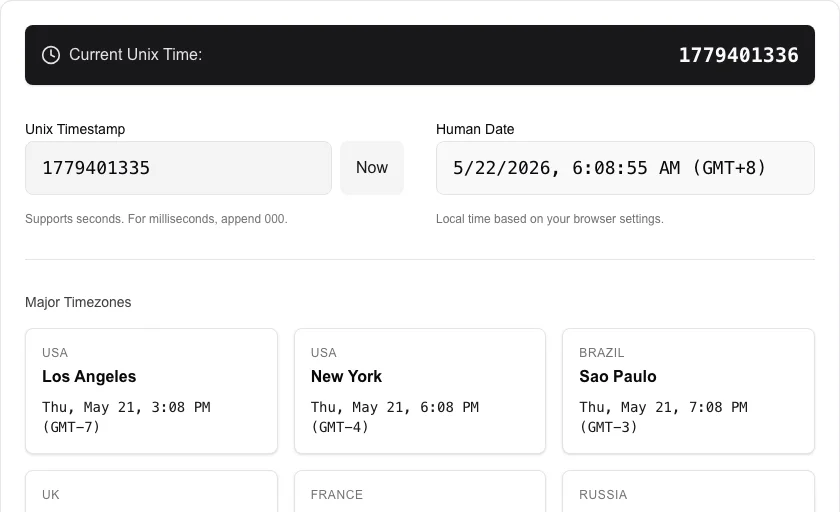
Unix Timestamp Converter
Convert Unix timestamps to human-readable dates and vice versa.
About Unix Timestamp Converter
The ultimate tool for converting between Unix timestamps and human-readable dates. Essential for developers working with server logs, database timestamps, or API integrations where epoch time is standard.
How to Use
- Enter a Unix timestamp to see its human-readable date counterpart.
- The converter automatically updates in real-time as you type.
- View the conversion in your local timezone and major global timezones.
- Click 'Now' to get the current system timestamp.
Common Use Cases
- Debugging server logs that use seconds since the epoch.
- Calculating expiration dates for JWTs or session cookies.
- Standardizing timestamps across different timezones and systems.
Technical Details
Supports both 10-digit (seconds) and 13-digit (milliseconds) timestamps. Calculations are performed using the JavaScript Date object within your local browser environment.
Frequently Asked Questions
- What is Unix time?
- Unix time is the number of seconds that have elapsed since January 1, 1970 (UTC), not counting leap seconds. It is widely used in computing for its simplicity.
- Does it handle milliseconds?
- Yes, if you enter a 13-digit timestamp, it will be correctly interpreted as milliseconds.
- Does the converter support milliseconds?
- Yes. The tool automatically detects whether a timestamp is in seconds (10 digits) or milliseconds (13 digits) and converts accordingly.
- What timezone does it use?
- Results are shown in both UTC and your local browser timezone so you can compare them side by side without manual conversion.
- Can I convert a date back to a Unix timestamp?
- Yes. Enter any date and time in the date field and the tool immediately outputs the corresponding Unix timestamp in both seconds and milliseconds.
- Can I convert a batch of timestamps at once?
- The Unix Timestamp Converter currently converts one timestamp at a time. For batch conversion of many timestamps — for example from a log file or database export — you can use a spreadsheet formula: in Excel or Google Sheets, =A1/86400+DATE(1970,1,1) converts a Unix timestamp in cell A1 to a date. In Python, datetime.utcfromtimestamp(ts) converts a timestamp to a human-readable date. For quick single-value lookups, this browser tool is the fastest option with no installation required.
Local processing
Our local file, text and chart tools process content on your device using JavaScript, browser APIs and, where needed, WebAssembly. Our usage events do not include filenames, file contents, input text, chart values, raw errors, emails or license references. Network lookup tools (such as DNS, WHOIS, IP and speed tests) contact external services for their stated purpose. Loading the website, fonts, libraries and models also makes network requests. WebAssembly itself does not prevent network access.